Taking Notes With The Terminal - Context Switching Without Losing Your Mind
tl;dr: My pitch is, you anyway write your notes in Markdown-like text files; why not index and search them with zk-org? I use Neovim, but the setup is editor agnostic. This is not overkill.
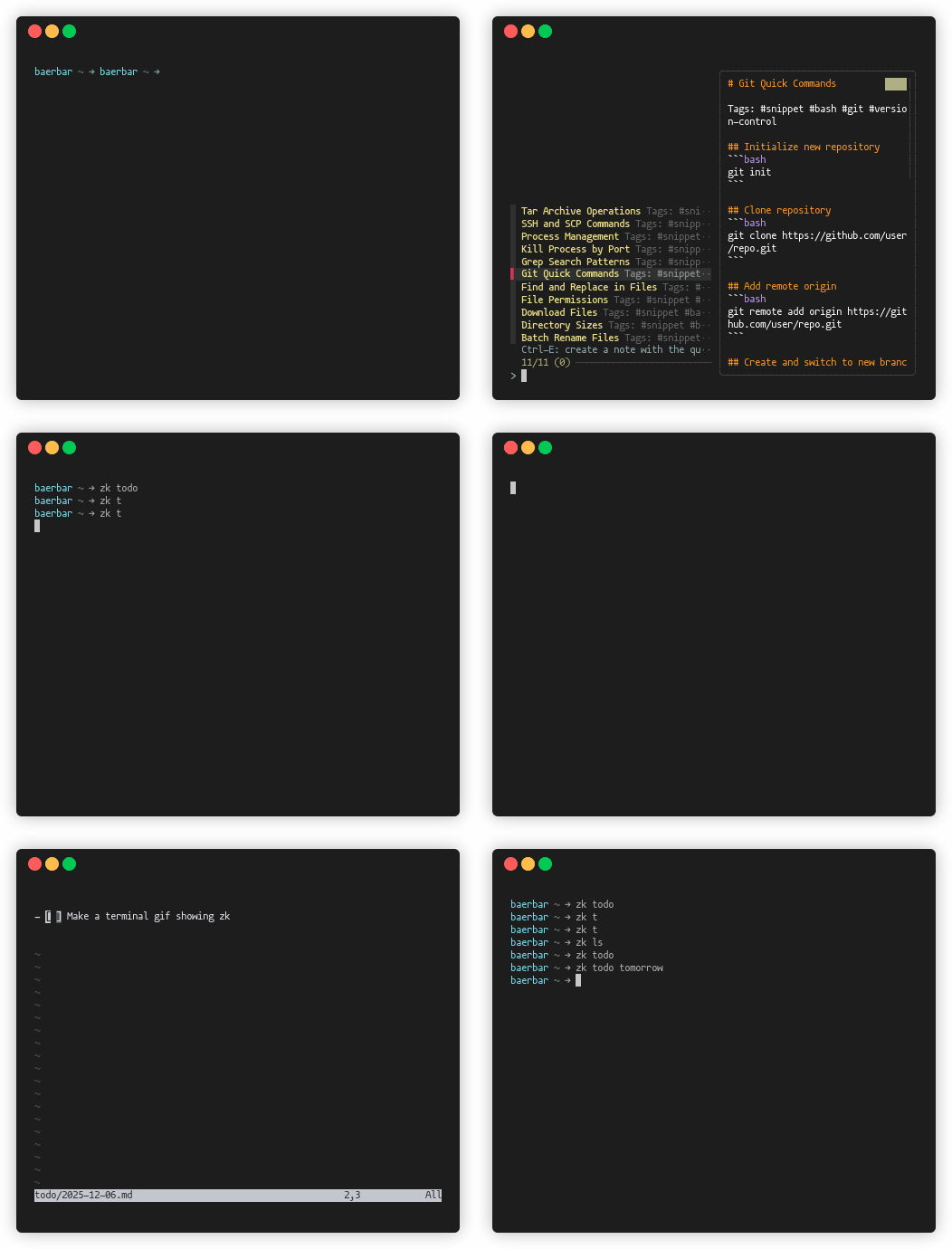
Context switching is your problem
I constantly jump between meetings, problems, and digital fires, all while trying to maintain a strategic overview. Privately, I juggle too many open projects as well. Half my stress isn’t the work itself — it’s trying to remember where I left off. My brain never reloads context fast enough. If you feel a little ADHD-ish at work, it might not be you. You might just need a better todo/notes system.
I tried the usual tools:
- Trello for recipes and daily todos.
- Notion / Google Tasks for project notes.
- Emailing myself links as a “read later” system.
- Outlook “To Do” at work.
None of it felt natural. I don’t want another app, dashboards, backlinks, or graphs of my notes. I want something fast, searchable, and editable in the text/code editor I already use. That rules out tools like Obsidian.
What worked best was keeping everything in a single file per day—meetings, tasks, and stray thoughts.
vim ~/todo/$(date +%Y-%m-%d).md.
But when I switch context \(5\cdot10^6\) times a day, even a simple daily log can turn into a mess.
From Sönke Ahrens in his book “How to Take Smart Notes” we can use Cognitive offloading to focus. Our brains are for having ideas, not holding them.
Writing things down lets your brain focus on other tasks, but only if you can easily find them again. If notes are hard to retrieve, your brain won’t trust the system.
It’s an interesting book if you enjoy deconstructing the concept of a note and the cult-like enthusiasm for Zettelkasten. I didn’t. But the point is clear: I need to find a way to quickly write down AND search my notes, without a specialized window open.
The solution you are looking for is “zk”
The obvious solution is to write things down. The practical problem is making those notes fast to create and fast to find. This year, I found zk-org/zk, and it turned out to be exactly what I wanted: A small CLI tool that indexes and searches Markdown files.
You write notes as plain Markdown in your editor.
zk keeps an index (SQLite) and lets you instantly search by title, tag, content, or date.
No daemon. No UI. Just open the note in your editor.
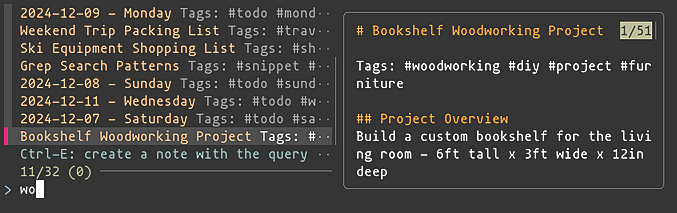
Like Obsidian, zk is Zettelkasten-based, but unlike Obsidian, it stops at indexing and search.
In practice, my notes follow a simple structure: Metadata for indexing, free text for thinking, and Markdown tasks for follow-ups.
---
date: December 05, 2025
title: Title of my Meeting
tags: [tag1,tag2]
---

Kristoffer, Kim, Jimmy

- This is an example meeting/note.
- Maybe a meeting? Maybe a project? But interesting things were discussed.

- [ ] This is an example of a open task
- [x] This is an example of a closed task
Because it is a CLI tool, you can very easily customize the workflow with standard GNU tools,
and terminal fuzzy-finding and ripgrep.
This is where zk really shines if you enjoy composing small tools.
For example using GNU date you can use relative dates to access todo list for other days.
todo = 'zk new --group todo --no-input --date "$(date -d "$*" +%Y-%m-%d)" "$ZK_NOTEBOOK_DIR/todo" --template todo.md'
zk todo # open today's todo-list
zk todo tomorrow # open tomorrows todo-list
zk todo next monday
zk todo yesterday
For the last months working with zk I got annoyed I didn’t start earlier. I remember working on something else
years ago, but not the the details. Where are my notes??
I know I worked with this before!
I don’t want to use vim
But have you heard of Neovim?
Okay, That’s fine.
zk has nothing to do with your editor.
It indexes and searches notes.
Opening and editing is delegated entirely to whatever editor you prefer.
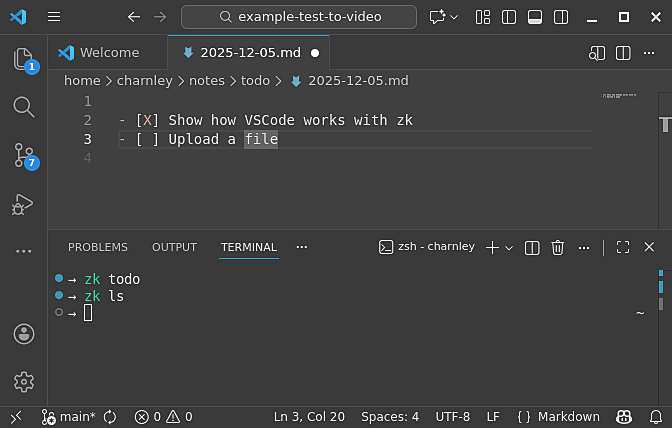
If you are using VSCode or equivalent, you can configure zk config.toml to set the editor,
editor = "code -r" # Using VSCode
editor = "idea" # Using IntelliJ
So when you select/create new notes they will be open straight in your editor. Note there is also a optional VSCode plugin github.com/zk-org/zk-vscode, however it is not needed. Just use the VSCode terminal to search notes.
How I use zk at work
At work, I use zk as a searchable work log, meeting archive, and task tracker.
My notes is are a folder full of Markdown files that I could be storing on OneDrive,
but I still like to have the history tracking of my notes, so in the end I use Git to manage my notes, and using OneDrive as a git --bare server (setup git bare server) for backup.
flowchart LR
    Editor["Your Editor<br />(VSCode / Vim)"]
    Notes["~/notes<br />(Git Repo)"]
    OneDrive["~/OneDrive/notes.git<br/>(Remote --bare Backup)"]

    Editor --> Notes
    Notes -->|git push| OneDrive
In practice, this means
- Daily todos to stay focused.
- Meeting notes with attendees and follow-ups.
- Tags for projects and recurring topics.
- Markdown tasks to track unfinished work.
- Searches for open tasks to surface forgotten items.
- A personal wiki for internal links, runbooks, and snippets.
Since I am at work, I don’t mind the in-house licensed AI models reading my notes,
I can copy-paste meeting transcripts, use Sonnet to convert them to Markdown, and find follow-ups.
Obviously, I use sst OpenCode for my agentic AI work, which works well with our company-licensed models,
and fits my tmux-based workflow.
How I use zk privately
For private notes, I care about who can read them (AI or not).
Scenarios that kept happening
- I’m in bed and see an interesting project I want to revisit later.
- I’m in the supermarket and need a shopping list or recipe.
- I’m doing taxes and can’t remember what I did last year.
What I needed was the same thing as at work: searchable notes, but accessible on my phone and under my control.
I keep my private notes in a Git repository hosted on Linode, accessed over SSH.
A private GitHub repository would also work, but I prefer not to have personal notes end up as training data for someone else’s models.
flowchart LR

    subgraph Laptop["Laptop / Desktop"]
        LEditor["Editor"]
        LRepo["Notes (.git)"]
        LEditor --> LRepo
    end

    subgraph Mobile["Mobile"]
        GitSync["Git Sync"]
        Obsidian["Obsidian"]
        MRepo["Notes (.git)"]
        GitSync --> MRepo
        Obsidian --> MRepo
    end

    Remote["Remote Repo<br/>(Linode)"]

    LRepo -- SSH --> Remote
    MRepo -- SSH --> Remote
With everything interconnected, the challenge of finding relevant information has largely become moot. If I’m standing in the supermarket and need the grocery list for lasagne, I open it on my phone. The important part isn’t mobile editing - It’s knowing that my notes are searchable and available wherever I am. I can pick up the thread and continue, without trying to remember what past-me was thinking.
Conclusion
- You already have an editor open.
- You already write Markdown-like notes.
So stop searching for the perfect app.
Put your notes in plain files.
Index them and search them with zk,
And make sure you can find them again.
Appendix: How to get started
Sold on the idea?
Following
zk-org.github.io/zk
we can easily set up zk.
Install
If you are on a mac, you can simply use brew.
brew install zk fzf ripgrep
If you are on linux or windows WSL2, you need to install the three dependencies with:
You can then compile zk by clone and make-ing it, with go.
cd $HOME/opt/
git clone https://github.com/zk-org/zk.git zk.git --depth 1
cd zk.git
make build
ln -s $HOME/opt/zk.git/zk $HOME/bin/zk
Setup
With the executable installed, create a note folder ~/notes/ and git init.
Inside the folder create a .zk for your configuration and templates.
For me the setup is
.zk
.zk/templates
.zk/templates/todo.md
.zk/templates/default.md
.zk/templates/meeting.md
.zk/config.toml
.zk/.gitignore # ignore .sqlite
A template would look something like this
default_template.md
---
date:
title:
tags: [Untitled]
---

# Untitled

- Untitled
Why have “Untitled” in my template? Because I sat up my editor Neovim to jump through “Untitled” so I can quickly ncw (next match, change word).
Configuration
My configuration for filename format, and other settings looks like;
config.toml
[note]
language = "en"
default-title = "Untitled"
filename = "-"
extension = "md"
template = "default.md"
id-charset = "alphanum"
id-length = 8
id-case = "lower"

[group]

[group.todo]
paths = ["todo"]

[group.todo.note]
filename = ""
extension = "md"
template = "todo.md"

[group.meeting]
paths = ["meetings"]

[group.meeting.note]
filename = "-"
extension = "md"
template = "meeting.md"

[format.markdown]
hashtags = true

[tool]
editor = "vim -c \"silent! /Untitled\" -c 'call search(\"Untitled\")' "
pager = "less -FIRX"
fzf-preview = "bat -p --color always {-1}"
fzf-options = "--multi --tiebreak begin --exact --tabstop 4 --height 100% --no-hscroll --color hl:-1,hl+:-1 --preview-window wrap"

[alias]

# Create new note, from templates
n = 'zk new'
today = 'zk new --group todo --no-input "$ZK_NOTEBOOK_DIR/todo" --template todo.md'
meeting = 'zk new --group meeting'
m = 'zk meeting'

# Usage:
# - zk todo next friday
# - zk todo tomorrow
# - zk todo yesterday
todo = 'zk new --group todo --no-input --date "$(date -d "$*" +%Y-%m-%d)" "$ZK_NOTEBOOK_DIR/todo" --template todo.md'

# Find and edit
last = "zk edit --limit 1 --sort modified- $argv"
recent = "zk edit --sort created- --created-after 'last 7 days' --interactive"
recent-month = "zk edit --sort created- --created-after 'last 30 days' --interactive"
ls = "zk edit --interactive --sort created"
t = "zk edit --interactive --tag $(zk tag --quiet | fzf | awk '{print $1}')"
ta = "zk edit --tag $(zk tag --quiet | fzf | awk '{print $1}')"

# Manage the notes
update = "cd $ZK_NOTEBOOK_DIR; git add -A; git commit -am 'updating'; git pull; git push; cd -"
clean = "zk-clean"
clean-dry = "zk-clean --dry-run"
sync = "zk update && zk index"

# Find all unresolved tasks within a zk tag
open-tasks = "cd $ZK_NOTEBOOK_DIR; zk list --tag $(zk tag --quiet | fzf | awk '{print $1}') --format  --quiet | xargs rg --no-heading --with-filename -F '[ ]'"
Where noteable alias I’ve setup are
# Use GNU date to interpret relative dates for todo lists. For example
# - zk todo
# - zk todo tomorrow
# - zk todo yesterday
# - zk todo next friday
# - zk todo 3 months 1 day
# - zk todo 25 dec
todo = 'zk new --group todo --no-input --date "$(date -d "$*" +%Y-%m-%d)" "$ZK_NOTEBOOK_DIR/todo" --template todo.md'

# Use fzf to interactively choose the tag I then want to search in
t = "zk edit --interactive --tag $(zk tag --quiet | fzf | awk '{print $1}')"

# Use git to pull and push, then re-index the zk database
update = "cd $ZK_NOTEBOOK_DIR; git add -A; git commit -am 'updating'; git pull; git push"
sync = "zk update && zk index"

# Find all unresolved Markdown tasks within a zk tag, with fzf and ripgrep
open-tasks = "cd $ZK_NOTEBOOK_DIR; zk list --tag $(zk tag --quiet | fzf | awk '{print $1}') --format  --quiet | xargs rg --no-heading --with-filename -F '[ ]'"
Mobile Compatible Setup
On your mobile install
The setup is then, use GitSync to clone, pull, push the note git repository. Then use Obsidian to search and edit Markdown. GitSync can also be set up to auto-sync on Obsidian open/close. Personally I found a manual usage worked fine.
For Obsidian Mobile configuration, ensure that “daily” format is the same as with zk, for both filename and directory.
Settings -> Daily notes
- Change "Date format"
- Change "New file location"
- Check "Open daily note on startup", to auto open today's note
Tag and search will work out of the box. The interface is somewhat clunky, but good enough.
References
- github.com/charnley/dotfiles - my dotfile configuration
- github.com/zk-org/zk.git - the main tool to search your notes. Getting started with zk.
- Obsidian - Overkill Zettelkasten-based note taking application
- ViscousPot/GitSync - Sync git repos on your phone.
- Sönke Ahren - How to Take Smart Notes - this is not a recommendation, just a reference.
- Jeff Su - Productivity System - Video about doing todo-lists. Capture quickly, Organize clearly, Review frequently, Engange effectively.
- Setting Up Obsidian Git on iOS - alternative when having problem setting up Obsidian + Git Sync on iPhone